FileDrop
Send files securely across the globe. No limits, no tracking.
How FinlyZone Architecture Works
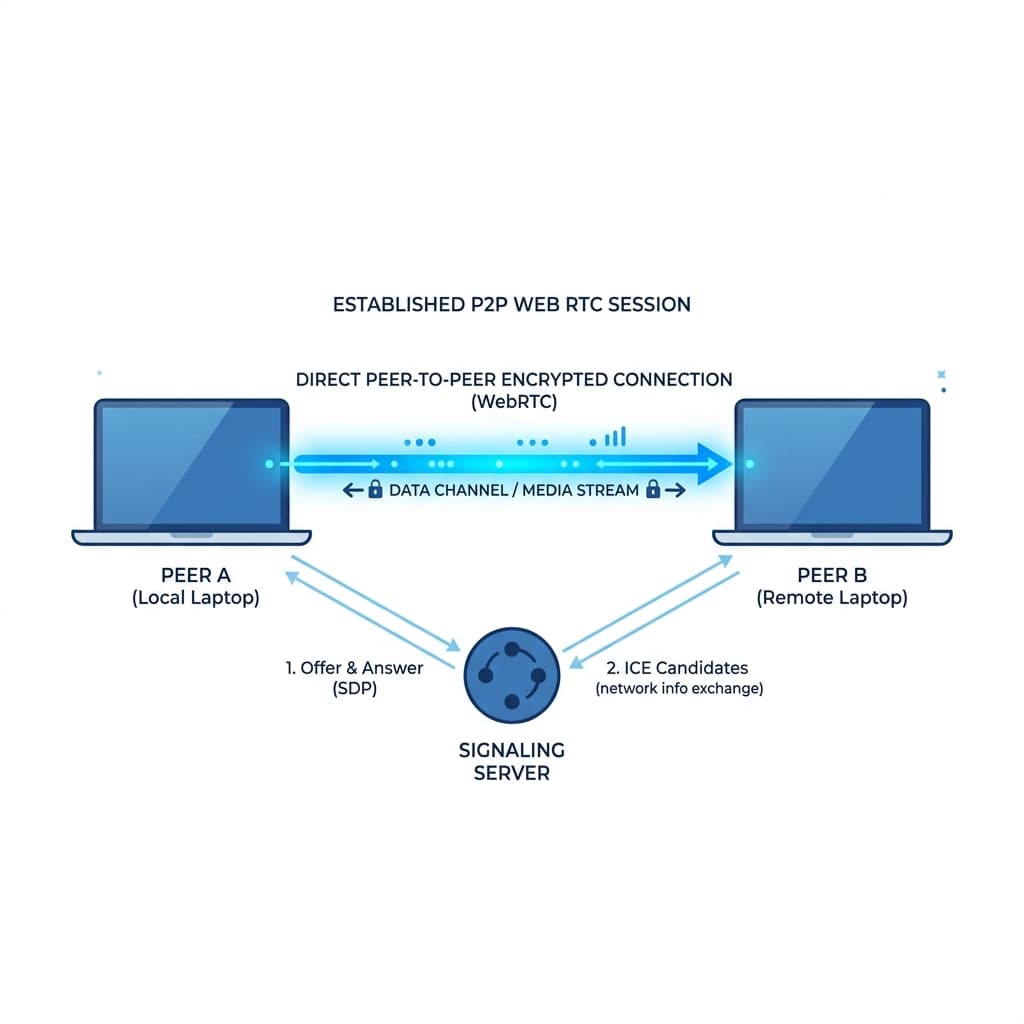
FinlyZone's FileDrop is built on a Zero-Knowledge, Peer-to-Peer (P2P) architecture. Unlike traditional applications that store your data on centralized databases, FinlyZone acts purely as a stateless relay. Your data never touches our disks.
MQTT Signaling
When you create a room, you connect to a lightweight MQTT broker. This broker acts as a stateless switchboard, instantly routing encrypted signals between peers to establish the connection.
WebRTC Mesh
For high-bandwidth data like Video Calls and Screen Sharing, FinlyZone upgrades the connection to a WebRTC mesh network. Video streams directly from your camera to the recipient's screen.
AES-GCM Encryption
Every message, file, and whiteboard stroke is locally encrypted in your browser using the Web Crypto API before being transmitted. Only users with the exact room URL can decrypt the data.
What is FileDrop?
FileDrop is a zero-knowledge, peer-to-peer file transfer tool that lets you send large files directly between devices across the internet. There are no file size limits, no server uploads, and everything is fully end-to-end encrypted.
How FileDrop Works
- Select File: Choose the file you want to send. A unique secure connection code is generated.
- Share Code: Give the connection code (or link) to the recipient.
- Direct Transfer: Once they enter the code, a direct WebRTC tunnel is established between your browsers.
- Secure Streaming: The file is streamed directly from your device to theirs, completely bypassing our servers.
Why Use FileDrop?
- No File Size Limits: Send huge video files, large datasets, or massive archives without hitting an upload limit.
- Maximum Privacy: Files are never stored on a third-party server, meaning no one can intercept or steal your data.
- Lightning Fast: By removing the middleman, files transfer as fast as your connection allows.
- End-to-End Encryption: Your files are heavily encrypted in transit using industry-standard protocols.
Frequently Asked Questions
Is there a file size limit?
No. Because files are streamed directly between devices peer-to-peer, we don't store them on our servers, so there are absolutely no file size limits. You can send a 1MB photo or a 50GB video file.
How is this different from Google Drive or WeTransfer?
Traditional services require you to upload the file to their server first, and then the recipient downloads it from their server. FileDrop connects your device directly to the recipient's device. The file streams directly from you to them.
Is the transfer secure?
Yes. The WebRTC connection uses DTLS (Datagram Transport Layer Security) and SRTP (Secure Real-time Transport Protocol). Your files are heavily encrypted end-to-end.
Explore More Privacy Tools
Need a secure chat room or a self-destructing note?